Last week I published a reflective post on how agentic coding has changed my working day and the shape of the profession. I now want to turn to the other side of that coin: not the philosophy, but the mechanics — the habits, the workflows, the accumulated tricks that turn agentic coding from an occasionally impressive demo into a dependable way of working.
This post is my field manual. It’s what I’ve learned over the past few months, mostly by getting things wrong and slowly figuring out better approaches. Your mileage will vary, but all of this is what I actually do, now, on a working Thursday in April 2026.
This is not a tutorial. If you haven’t yet fired up Claude Code or one of its cousins, there are much better resources than me for getting started. What follows assumes you’ve dipped a toe in, and are wondering how to wade further without drowning.
Mind the Context Window
The single most important habit I’ve developed is keeping the context window small and disciplined. Everything else flows from this.
In my earliest fumblings with Claude, I foolishly tried to treat it as a very long-running conversation — keep the session open, keep adding to it, keep referring back to earlier exchanges, hope it would start to “learn” how I wanted to work. This works fine for a little while but then degrades, often suddenly. The context gets cluttered with dead ends, half-finished experiments, and other assorted noise. Compaction may occur. The agent’s output quality drops, subtly at first, and then obviously. This is infuriating, especially if you have been laboriously supplying Claude with many manually-typed pointers, an approach which does not, incidentally, scale.
The remedy is to clear often. I clear the context in each of my Claude windows several times a day — most obviously whenever I finish a discrete piece of work, but also between different phases of the work (plan, implement, review), or if I sense the quality drifting. The /clear command should be one of your most-used keystrokes.
But this only works if you have somewhere durable to put the context that does matter — all that information you were desperately trying to convey to Claude — which is why plans and documentation artefacts become so central. The short-lived session then only needs to hold the current work in progress; the long-lived documents hold the accumulated knowledge.
The other side to context discipline is the use of subagents. For any task that involves significant research — exploring an unfamiliar area of a codebase, checking how an API actually works, digging through documentation — I’ll dispatch a subagent to do the investigation and report back to the main agent with a summary. The subagent’s verbose exploration stays in its own context, the main session sees only the distilled conclusion. This is analogous to how you’d work when assigning a research task to a colleague: you don’t want them simply dumping their entire browser history on your desk, you want a summary of what they found out.
Plans as Artefacts
The second habit that dramatically improved agentic coding for me was to treat plans as first-class artefacts, rather than as a transient staging post inside a longer session.
I’ve built a small skill called /raise-issue that takes a handful of vague notes — a bug, a feature I’ve been mulling over, a refactor that’s been nagging me — and produces a properly-structured GitHub issue in my preferred format, complete with labels, acceptance criteria, and links back to related work. It’s the difference between “I’ll write that up later” and “it’s on the board.”
When I’m ready to tackle the work, that GitHub issue becomes my starting point for a shiny new conversation with Claude. I point Claude at the issue and ask it to produce a considered plan, usually output as a comment on the issue. We review and iterate on this plan together, maybe choosing to spawn off sub-issues if the size of the work warrants it. Then — and this is the important part — I close that session and start a fresh one to do the implementation, pointed at the comments or sub-issues containing the plan.
This achieves several useful things. It separates the thinking from the doing (and, as we’ll see later, from the reviewing), which means that the implementation session starts clean, without all the exploratory back-and-forth of the planning session cluttering its context. It produces a reviewable artefact that you (or a colleague) can sanity-check before any code gets written. And it creates a durable record that survives the session, so that weeks later you can pick the work back up without having to reconstruct your own thinking from scratch.
A practical upshot of this separation: you can use different models for each phase. I generally use Opus for the planning conversation — this is where the genuinely hard thinking happens, and where quality matters most — then switch to Sonnet for the implementation that follows. The quality difference on routine implementation work, where there are patterns to follow and decent guardrails in place, is smaller than you might imagine. Use Opus where it earns its keep, not reflexively.
The corollary skill at the other end of implementation is /ship: it takes whatever pending work is in the current worktree, composes a commit message in the house style, pushes the branch, and opens a PR with a description that references the originating issue. A dozen keystrokes of ceremony collapsed into one word — and a well-formed PR with a clear description is precisely the input the review stage wants.
Review as a Third Context
Once the plan is made, and the implementation has been completed in a second context, I do one more thing that has improved the quality of my output more than I expected: I clear the context again and use /review or a custom code reviewer agent to get Claude to review the work fresh.
The key word here is fresh. A Claude session that’s just spent tens of thousands of tokens implementing a feature is not well-placed to critique that same feature. It knows why every decision was made, because it made them. Ask it to review its own work and you’ll get polite agreement, minor nit-picks, and a general tendency to defend the choices already baked in. This is the same cognitive bias that makes human self-review less useful than peer review.
Close the implementation session. Start a new one. Say /review PR 1234. If the PR has a good description, and is linked back to the issue containing the plan, then this will be excellent context for the new Claude to review the work as if it were a senior engineer arriving cold. Does this implementation match the plan? Are there edge cases missed? Are there simpler approaches that were overlooked? Is anything here going to bite us in the middle of the night in three months’ time?
Without the implementation history cluttering its context, Claude is genuinely willing to push back. It’ll question choices the implementation session was committed to. It’ll spot tests that should exist but don’t, or weak assertions. It’ll notice that a pattern used here conflicts with the convention used elsewhere in the codebase, or that the same pattern of bug is present in a sibling file.
Two small additions make this habit pay off more. The first is model selection: I use Opus for reviews, even when I’ve used Sonnet for the implementation. Review is one of the few stages where the quality of judgement matters more than the speed or the cost, and it’s bounded — a single pass, a single output — so the price delta is negligible. The second is documenting the review as a GitHub comment on the issue or PR. The plan lives on the issue; the implementation closes the issue; the review comment sits alongside both. A year from now, when someone (probably me) needs to understand why a particular decision was made, the full three-stage record is right there.
Some people have reported success using different agents for the implementation and the review. My experience is that this is unnecessary. There is, I concede, something faintly philosophical about asking an agent to mark its own homework. But with the context genuinely isolated, the reviewer and the implementer are not really the same entity any more than two different humans sharing a language are the same person. They’re two sessions with the same weights and quite different beliefs about the problem. That turns out to be enough.
Guardrails First
Agentic coding amplifies whatever engineering disciplines you already adhere to. If your codebase has good tests, strong types, consistent linting, and clean CI, the agents work beautifully — they get fast feedback, they catch their own mistakes, and you can trust their output. If your codebase has none of these things, the agents will cheerfully produce plausible-looking code that doesn’t work, and you’ll spend more time debugging their output than you saved by not writing it yourself.
The implication is obvious but worth stating plainly: invest in guardrails first. If you’re inheriting a codebase with thin test coverage, the single best use of your first agentic sessions is to get coverage up. Tests at every level — unit tests, integration tests, end-to-end tests via something like Playwright MCP for web applications. Linting configured strictly. Types enforced where possible. CI that actually fails the build when things go wrong.
Here’s the nice thing: the agents are excellent at writing tests. This is where a virtuous circle starts. Get the agents to build the scaffolding that will let you trust the agents. It feels recursive, and it is, but it works.
Agent Configuration as Code
The next habit that paid dividends was treating my agent configuration as code — versioned, shared, structured, and curated.
At the simplest level, this means using CLAUDE.md files seriously. I keep one at my user level with personal preferences (how I like code formatted, my general conventions, the voice I want in generated commit messages). I keep another at each project level with project-specific context (architecture notes, the domain language, gotchas particular to this codebase). These files are not long — a few hundred lines at most — but they dramatically reduce the amount of prompt-level repetition in day-to-day sessions.
Beyond the CLAUDE.md files, I maintain a dedicated git repository called claude-config that holds my reusable skills, agents, and configuration. Symlinks from the various places these files need to live point back to this repo, so everything stays versioned and shareable. When I figure out a better prompt for generating a PR description, or a better skill for investigating a bug, the improvement lives in claude-config and propagates everywhere.
A “skill” is a reusable workflow — a set of instructions for how I want a particular class of task handled. The two skills I flagged earlier — /raise-issue and /ship — are representative: each is a few dozen lines of markdown encoding one such pattern. The activation energy for using a complex workflow drops to nearly zero, which means I actually use complex workflows, which means the output quality is higher.
If you work in a team, a shared AI agent config repository (or equivalent) is an underrated investment. Once one developer figures out the right skill for generating your company’s particular flavour of PR description, every developer can benefit.
Worktrees: The Accelerant
If I could convince the typical IDE-bound developer to change exactly one thing about their setup, it would be this: learn to use git worktrees, and use them to run multiple Claude Code sessions in parallel.
A worktree is just a separate working directory attached to your existing git repository. Instead of the old ritual of stashing your current work, switching branches, doing the other thing, switching back, and restoring your stash, you simply have multiple checked-out working directories at once, each on a different branch, each entirely independent.
Here’s what my working setup looks like. My Studio Display has six terminal panes arranged in a grid. Each pane is a separate worktree of the project I’m currently working on, running a separate Claude Code session. One pane might be running a long refactor, another might be writing tests for a new feature, a third might be investigating a bug, a fourth might be updating documentation, and so on.
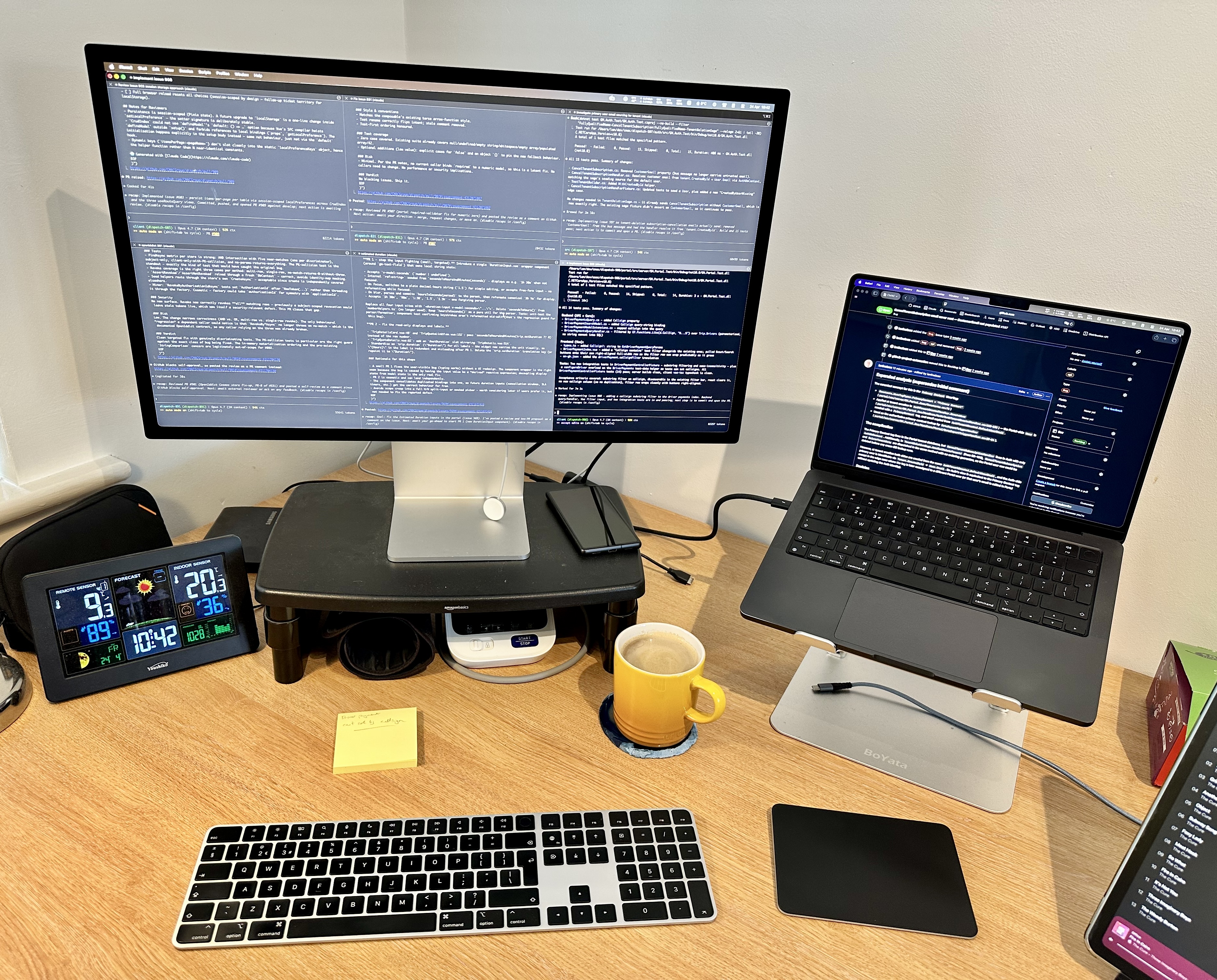
This is the setup that makes the “features and bugs and tech debt” parallelism I wrote about in the previous post actually possible. You can’t do that kind of multi-threaded work with one terminal and one session. You can with six.
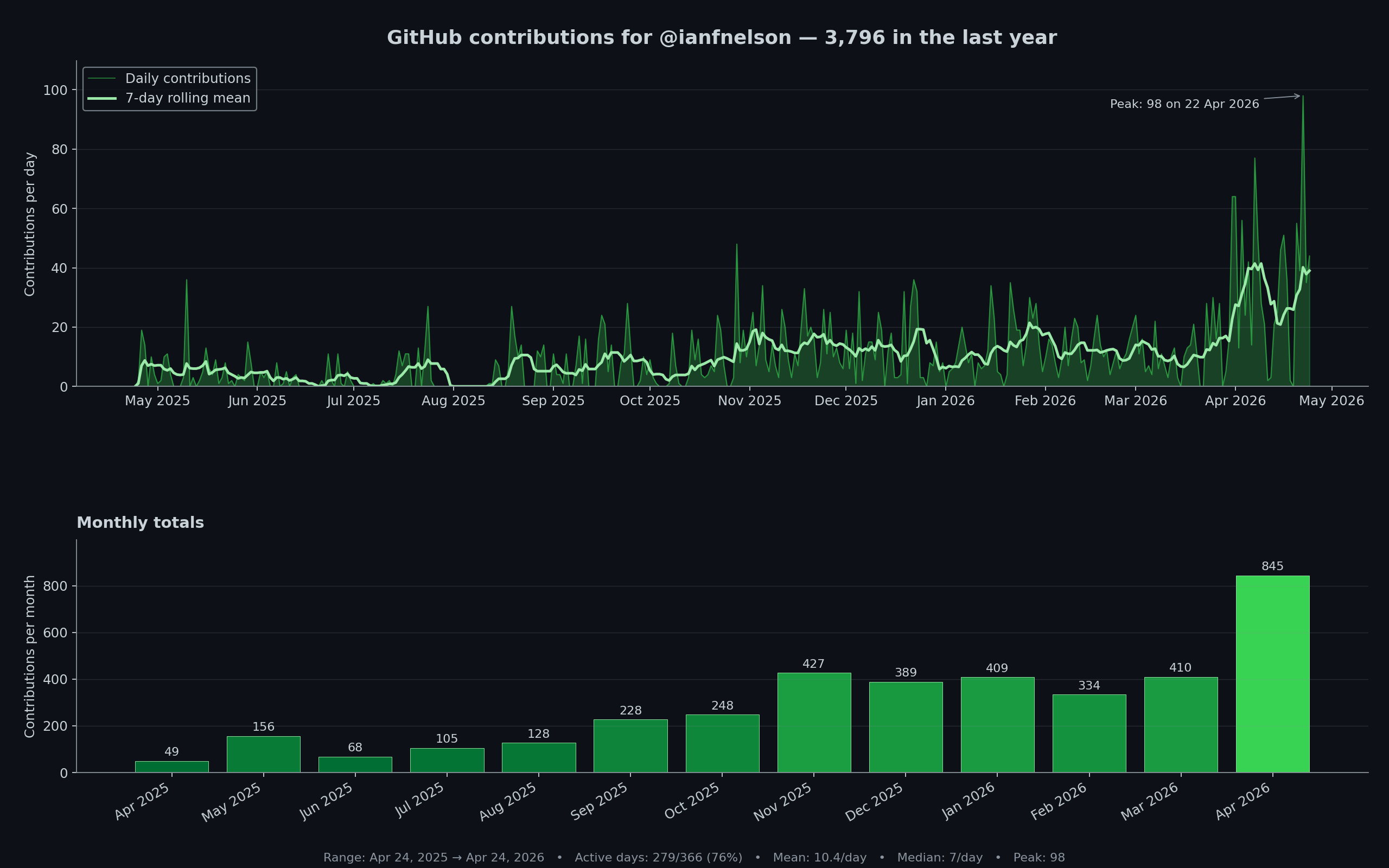
My GitHub contribution graph. Contribution count is, I concede, a crude proxy for productivity — it counts commits rather than judgement — but the shape of the graph quantifies something real about the shift I’ve been describing.
The practical cost of setting this up is modest. git worktree add creates a new worktree. Periodically I delete all my worktree folders and do git worktree prune. The hardest part is the mental shift from “I am working on one thing at a time” to “I am orchestrating several things at once,” and that shift takes a few weeks to settle.
For a little while I started to get antsy if I wasn’t responding to the Claudes quickly enough, or if too many of the panes were idle, which is just a ridiculous state of mind. I’ve got over that now, and just cycle my attention round the Claudes in a more sedate manner. The recently-introduced recap functionality — Claude now offers a summary when a session’s been idle for a little while — has helped hugely with this workflow.
Once you’re working this way, you stop context-switching in the bad sense. Each pane has its own persistent context, so when you return to a pane after ten minutes elsewhere, everything is exactly as you left it. The cognitive cost of multiplexing drops because the agents are holding most of the state, not you. Use of /rename and /color helps with distinguishing one pane from another.
Beyond Writing Code
The last habit I’d emphasise, because it’s the one developers most often miss: Claude Code is not just for writing code. It’s an agent with access to your terminal, which means anything you can do from a terminal, it can potentially do for you.
Some of the tools that live in my agent’s toolkit:
gh — the GitHub CLI. Claude can read issues, comment on PRs, create branches, merge changes, and generally do the ceremonial paperwork of working with GitHub, without me having to alt-tab to a browser.
az and kubectl — for the Azure and Kubernetes work that makes up much of my current client engagement. Claude can investigate live systems, check logs, inspect resources, and even (with appropriate caution) make changes. Much easier to ask Claude to check the current state of resources in the test environment rather than clicking through seventeen Azure Portal blades.
SQL via MCP — with the appropriate MCP server, Claude can query databases directly. Enormously useful for investigation and debugging, and for writing migration scripts with genuine awareness of the current schema.
Playwright MCP — for web application testing and investigation. Claude can drive a browser, check that a feature actually works end-to-end, capture screenshots, and verify behaviour in a way that static test code cannot.
Slack connectors — for reading threads and posting updates or requests for reviews and information. Thinking back to incidents I’ve had to respond to over the years, the ability to summarise a sprawling Slack thread, produce a timeline, or draft a status update would have saved me genuine time.
Claude Code for Chrome — for interacting with web applications, much easier than copy-pasting snippets of console logs or information from the developer tools.
The general principle: if you can think of a task that involves reading or acting on information outside your local codebase, there is almost certainly an MCP server, a CLI tool, or a connector that lets an agent help with it. The constraint is now much more often imagination than tooling.
Oh, and one more small thing, because it’s surprised me how often I use it: you can paste images directly into Claude Code with Ctrl-V (or Cmd-V on Mac). Screenshots of errors, UI mockups, architecture diagrams from a whiteboard, hand-drawn sketches — all of these become valid inputs.
Where to Start
If you’re coming from an IDE-centric workflow and this sounds overwhelming, you don’t need to adopt all of these habits at the same time. Start by using Claude Code in a single terminal pane, on a small and low-stakes project. Use it to help you get your project’s guardrails in place if they aren’t already there, such as boosting unit test coverage. Get used to clearing context, switching models, dispatching the occasional subagent. At some point you’ll find yourself asking Claude to do the same things multiple times, in specific ways, which is your cue to start a personal CLAUDE.md and begin curating a small library of skills. Worktrees are the real accelerant, but you need the foundations in place first.
These habits have taken me several weeks to internalise, and I now find myself wondering how I ever delivered anything working any other way.
Agentic coding in April 2026 is not a magic trick; it is a set of habits. The tooling is extraordinary, but it rewards those who treat it as a new discipline to master rather than a shortcut to exploit. If you approach it with the same seriousness you’d apply to learning any other new way of working — patience, iteration, a willingness to be bad at it for a while — it will, I think, repay the investment handsomely.